The NI Graphical Differencing and User Interface Toolkit helps you create interactive user interfaces for your models built using Simulink software as well as locate and visualize differences in models. The Graphical Differencing and User Interface Toolkit can determine differences between models that include standard Simulink blocks, subsystems, S-functions, and statecharts developed using The MathWorks, Inc. Stateflow® software.
The ecDIFF graphical differencing tool from ExpertControl compares two models and generates a list of the structural, textual, parameter, and visual (cosmetic) differences between the models. You can filter this list by type and locate specific differences in the models by clicking on the difference in the ecDIFF utility.
The toolkit also includes a copy of the NI LabVIEW Base graphical programming environment and the LabVIEW Simulation Interface Toolkit. With LabVIEW, you can quickly create applications for data analysis and processing, data visualization, and task automation using an easy-to-learn graphical notation. LabVIEW is also the easiest way to connect to the real world using NI-DAQmx technology.
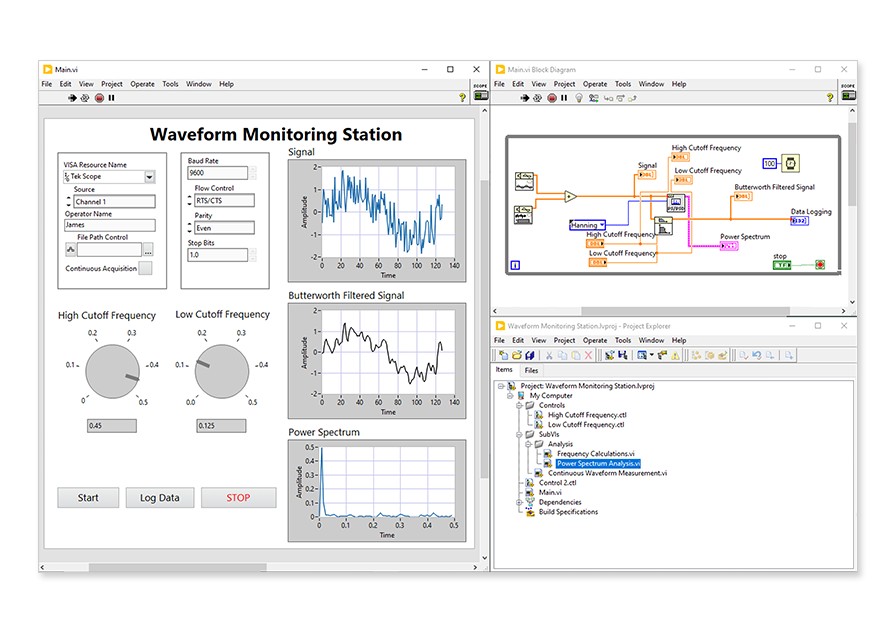
With the LabVIEW Simulation Interface Toolkit, you can easily build custom LabVIEW user interfaces to view and control your simulation model during run time. This toolkit also provides a plug-in for The MathWorks, Inc. Real-Time Workshop® software to facilitate importation of your models created in the Simulink environment into LabVIEW so you can connect your model to the real world through a variety of real-time I/O platforms (requires LabVIEW Real-Time). With these capabilities, you can easily take your models from software verification to real-world prototyping and hardware-in-the-loop simulation.
Simulink®, Stateflow®, and Real-Time Workshop® are registered trademarks of The MathWorks, Inc. Other product and company names listed are trademarks or trade names of their respective companies.